Watching or playing with anything in Flash Format on an iPad (iPhone or iPod) was impossible (as far as I know) in the past. Well, now you can at least view Flash stuff on an iPad using the app called iSWIFTER (Source).
HOW? Here we go:
Click here to keep yourself updated with latest discussions about Articulate on iPads.
STILL TROUBLESOME! Alright, it is still troublesome, but I suppose within the next few months Steve Jobs will figure out that supporting Flash is not so bad after all (Otherwise most e-learning content in Malaysia will be useless on an iPad). Or perhaps Adobe (behind Flash) figures out a way to please all Steve Jobs requirements to make Flash safe and smooth in an Apple world.
As for now, you will have to use apps like iSWIFTERto explore your i-Lectures (Articulate presentations) on an iPad. Let's hope that Apple embraces Flash fully in the near future. If not, then we have to find creative solutions, because certainly it will be tough to learn without an iPad or iPhone in the future. But, how do we view Articulate presentations on an iPhone? Can anyone enlighten us with possibilities? :)
"Backupify is an all-in-one archiving, search and restore service for the most popular online services including Google Apps, Facebook, Twitter, Picasa and more."
If you are looking for a tool to backup your social media stuff (Google Docs/Sites, Twitter, Blogger, Facebook, etc.), Backupify is a pretty cool tool. Though, you need to keep in mind that the free version is currently limited to 2GB storage, so the idea of using it for backing up for example your Gmail would also probably require you to invest in the commercial version, unless your Gmail account is below 2 GB (Very unlikely!!!!). Though, the current pricing is reasonable (Pro 100 version - $4.99/month), so it might be a good idea to consider such an option if your Gmail is critical to your work, studies and life.
Putting Gmail aside, I would recommend using the free version of Backupify to backup your blog, Twitter, and other social media stuff that are reasonably light. The free version does weekly backups of up to 5 accounts (e.g. Blogger, Twitter, Facebook, Google Docs, and Google Calendar). If you want to backup more accounts on a daily basis, then you need to subscribe to the commercial version.
If you are wondering how Backupify works, then watch this video tutorial:
Cool! But, are there better social media backup tools out there?
Or tools that enable you to backup unlimited social media accounts providing unlimited storage space? Now, that would be AWESOME :)
When the cat reaches the fishbowl, then pause the video and ask your Students/Participants (S/P) to figure out what happens next. Most likely you will get S/P's attention, and stimulate their minds to think creatively about what happens next in a competitive but enjoyable way. If you break S/P up into groups, and then give each group say 2 minutes to come up with their answer, you will get collaborative fun.
WARM UP S/P FIRST, OR THEY WILL ________! Using short videos found on the Internet as icebreakers to stimulate thinking and help people to get familiar with each other in new situations and environments is today easier than ever, because of the millions (I mean billions!) of videos freely available on sites like YouTube.
More importantly, before you engage your S/P to learn and interact with the subject matter in a face-to-face session (or online session), it is important to warm them up first, or awaken them from their sleep (or whatever they are doing/thinking). It is obvious in sports that we need to warm our relevant muscles before playing a particular activity; otherwise the likelihood of getting injuries increases significantly. Though, strangely enough not all lecturers/educators/facilitators apply this common sense idea to learning. Let's not forget that our Brain is also a muscle that needs to warm up too, or it would probably fall asleep (not literally!), or be in another dimension beyond the subject paradigm.
AWARENESS TEST
Remember to pause after the first scene when the passes have been made, and then ask 'How many passes does the team in white make?' Most S/P will probably answer correctly, and then you ask 'Did you see the Moonwalking bear?' And unless they have already seen this video (12+ million have already on YouTube alone!), they would have ignored that particular incident. Although, this is labelled as an awareness test, it is also a great short video to warm up students' minds before getting them busy with the subject matter.
IMPORTANCE OF LANGUAGE SKILLS
This one is a classic, which I commonly use to emphasize theimportance, relationship, and connection of language with understanding and thinking. Instead of being really serious about it, and making people uncomfortable when talking about such matters, you could use videos such as the one above to make a point (that probably sticks better, too).
I have watched this scene (above) from 'The Pink Panther 2' a bazillion times, but I still laugh every time I watch it. I have used this video in several workshops to indirectly encourage S/P to work on their English accents as that might hamper their communication with others (e.g. lectures and discussions), and that new accents can be learned (although it could take time). These are just four examples of using short videos (less than 5 minutes) found on the Internet to stimulate S/P to think, and break down communication barriers. The best part is that there are thousands, if not millions of freely available videos ready to be plucked from video sharing sites.
If you have any experiences, or discovered some mind stimulating short videos to share, please share it in the comments section (That would be great!).
HOW TO DOWNLOAD VIDEOS FROM YOUTUBE? I knew that question was coming (obviously!), and here is the answer (link below):
What about downloading and copyright? I discuss this issue a bit here.
Don't worry, be happy, and take calculated risks using short videos to stimulate thinking and breaking down communication barriers (though, please consider sensitivities to religion, culture and race).
It is amazing how fun a learning session can become by taking a few risks in the way we facilitate learning :)
1. DOWNLOAD YouTube videos? 2.CONVERT YouTube videos into a format supported by PowerPoint? 3. INSERT YouTube videos into PowerPoint (and run it offline smoothly)?
Since I am always asked those three (3) questions above, why not screencast it once for ALL! This screencast explores these questions:
RealPlayer- Downloading videos from YouTube and Converting them into other formats (e.g. wmv).
Format Factory - Converting videos to any other video format you can imagine.
If you are using PowerPoint 2003 (or 2010) no worries, because inserting videos into PowerPoint is as easy as toasting...Insert > Movies and Sounds > Movie from File (2003)...
"Openness plants seeds for future innovation. The work of many universities around open content has contributed to an ecosystem for innovation. Einztein is the latest company to try and add a value layer to freely available educational material. More and more of these companies will appear in the near future offering a combination of aggregation of open content, a central place to discover courses, tools to run aggregate courses, discussion forums for learners, and general course management tools (enrolling, sharing with other profs, grading, etc.). " -George Siemens
WHAT? Einztein, a non-profit headquartered in Santa Monica, California, is the brainchild of three democratizers of education who believe in a world where learning should be a function of desire not privilege. Einztein serves as a one-stop campus from which online learners can easily explore the universe of free online courses delivered by any combination of text, audio, video and other media. Whether you already know the course you’re looking for, or you just have a general idea, the purpose of Einztein is to make online courses easy to find. All courses featured on Einztein are hand picked, by their PhD level editorial team, based on their completeness and quality (Source).
In short, Einztein is a great starting point to find free quality online courses. Though, I would like to note that I did find broken course links and courses with no substantial content, so the editorial team needs be 'more picky'. Perhaps, include a few non-PhD level e-learning professionals (such as myself...) to ensure more completeness and quality :)
Facebook will be one of the main tools that we (IMU E-Learning) use to connect and share our e-learning adventures and stories as we explore, learn, share, facilitate and reflect together with IMU (International Medical University) educators, staff, and students regarding the amazing learning possibilities we have today.
As we are in the early stages of exploring social media (social networking, wikis, blogs, podcasts, Twitter, etc.) for learning at IMU, we hope that by openly sharing our learning stories, we will increasingly encourage more to participate and share. More and more universities or educational institutions around the world are exploring social media for learning, and we hope that our experiences shared can benefit others out there, especially new comers. Also, we do hope that this sharing initiative will lead to more connections and discussions with educators and students at IMU and beyond.
We have so much to learn, and by sharing and connecting with great people like you, we can learn faster and more effectively using our collective intelligence, or wisdom of the crowds (Oops, a few big words!).
Some might argue that you lose your competitive (e-learning) edge by being open and willing to share. I would argue that if you want to be leader in any field, you have to share your work and efforts, and be open to feedback and criticism. If you reflect and act upon these nuggets of feedback and criticism, you are probably going to improve faster than sticking to the old paradigm emphasizing indirectly that 'Hoarding Learning (knowledge, competencies and skills) is Power!'.
It should be 'Sharing Learning is Power'. Not much can be done alone, but it is amazing what we can do together collectively.
INGREDIENTS We are using the Facebook Page feature to share our e-learning adventures and stories. Here you will find the following tabs (sections):
The Wall Enjoy the learning stream, and please share your ideas, feedback (Like!) and comments, too.
Blog Here you can get easily access all the learning stories and resources explored on IMU E-Learning blog.
Discussions Here you can participate and share your thoughts and ideas on how we can improve learning at IMU, or anything related to learning, facilitation, creativity, innovation, etc.
Video For now we will mostly upload screencasts exploring the different learning tools explored during the workshops, and discuss how we could use them for developing more sizzling learning environments or content.
Pictures Pictures from all e-learning related events and workshops. So, if you have attended one, we might have caught a nice picture of you learning, or perhaps ______ :)
Links Resource links (URL) to amazing learning resources from around the world. Most of these amazing learning resource links are shared through IMU E-Learning blog, which collects and tries to make sense of them via refreshing resource collections.
IMU E-Learning Facebook Page is still very much under construction, so you can probably expect some interesting surprises as we explore and discover further.
MOVING ON!
Currently, most of the learning stories and resources shared on the Facebook Page are from the e-learning team, but we are working with several lecturers to share their learning stories, and will soon be encouraging several students to share their learning stories, too.
We are also working on a website (using Google Sites) entitled the 'Learning Innovation Lab', which will enable...(still under construction). For this social media learning sharing initiative we will be mostly using technology that is free and reasonably easy-to-use, meaning that anyone interested in doing something similar (or better!) to what we are doing, can do that without needing worry too much about hardware, software and hosting budgets (big zero!). Though, you would require time to do it, but if you see the value and have the passion, you will most likely find the time.
The good thing today, is that we have so many learning tools and possibilities to potentially use to facilitate learning. The sad thing is that due to that fact, many of us are obviously facing information (and tools) overload, and are clueless where to start.
In a learning shell, how do we use emerging (and old) learning tools to facilitate sizzling learning environments? How do we use learning tools and open educational resourcesto nurture students to ask deeper and more reflective questions, master their learning areas, think more creatively and innovatively, discover their passion, and eventually inspire them to become, or achieve their ultimate dreams (even the impossible)?
Not sure if that was correct, but the two (2) links or resources above are certainly worth exploring. I just came across a very interesting blog post by Jeffery Goldman exploring e-Learning and Games in Healthcare, and from there I extracted some very interesting resources, and mashed them up with some other Medical online resources discovered earlier...
172 Interactive Health Tutorials
If you haven't seen this amazingly healthy resource repository yet, it is about time! Just CLICK HERE to access 172 interactive health education resources (might have increased since I counted!) from the Patient Education Institute. Using animated graphics each tutorial explains a procedure or condition in easy-to-read language. You can also listen to the tutorials, and access the text summaries. Not bad!
NOTE: These tutorials require a special Flash plug-in, version 8 or above. If you do not have Flash, you will be prompted to obtain a free download of the software before you start the tutorial.
To get a taste of what I mean, here are 10 relevant interactive health tutorials (from the 172) to get you going and excited:
However, please keep in mind the terms of use if you are planning to share some of these tutorials with your students. In short, these tutorials can solely be used for our personal education... To be on the safe side, just link them to the repository page, and avoid deep linking, which the Patient Education Institute is terrified of.
Oops, I might have broken the law here, but if so, please correct me.
32 EDUGAMES
Now, what about free EduGames (Educational Games) related to Medicine and health (without needing to worry about deep linking)?
Here is a sizzling collection of free EduGames related to health, medicine and life (more EduGames!):
Deep Brain Stimulation Help Dr. Vanessa Mei cut, probe and drill her way to helping her patient cope with a movement disorder through brain surgery!
AIDtoCHILDREN The game will help to expand your vocabulary and help children in need while doing so. For every correct answer they will donate .25 cents to children in need.
Re-Mission Understand cancer better and develop a positive attitude toward defeating it.
WFP Foodforce Understand world hunger and efforts to alleviate it.
The POD Game Dispense drugs and medical advice to people during an emergency. Using this game, you can enhance your efforts to teach staff and volunteers to work efficiently and sensitively with the public to maximize throughput in times of crisis.
Blood Typing In this game you have to blood type each patient and give them a blood transfusion.
The Ear Pages Sound is caused by changes of pressure in the air that is transformed into nerve impulses in the inner ear. Explore "The Ear Pages" and collect the snail shaped symbols to gain points in the quiz!
NANOSWARM The NANOSWARM’s story is set in the year 2030 — a time when there is no war, no crime and no hunger. The reader meets five teenagers interning at MECHS, the world’s leading research center. Each struggles with MECHS’ stringent diet and exercise requirements. Scientists there are on the verge of eradicating all disease when a mysterious infection becomes an epidemic. After one of the interns is stricken, the other teens pilot a miniaturized vessel inside his body to discover the source of outbreak.
Immune Attack An educational video game that introduces basic concepts of human immunology to high school and entry-level college students. It aims to excite students about the subject, while also illuminating general principles and detailed concepts of immunology.
The Immune System Defender Ilya Mechnikov, inserted a thorn into a larva and noticed strange cells gathering around the thorn. The cells were eating any foreign substances entering the ruptured skin (devouring cells). Play the game to learn more!
Whack TB (Tuberculosis) There are almost 9 million new cases of TB each year; about 500,000 of these cases are resistant to the best TB drugs available to fight them. Play this game and learn more about fighting TB!” From the Families USA Global Health Initiative.
Escape from Diab Is a serious videogame adventure in healthy eating and exercise. It puts players inside a sci-fi action and adventure where healthy lifestyle choices are the keys to winning.
The Incredible Adventures of the Amazing Food Detective There has been a mysterious outbreak of unhealthy habits among kids, and we need to solve these cases. All junior food detectives will get secret training on how to eat right and exercise. Have fun playing the game!
The Food Detectives Fight BAC! The game gives kids a fun way to learn about foodborne illness. From New Mexico State University.
Snacktown Smackdown In this game, the player takes on the identity of a Kid Wisdom "agent" in a race to save the town from the evil Mayor's plans. After gathering healthy snacks for ammo and traversing a treacherous playground, the player must battle three possessed vending machines.
Fatworld A video game about the politics of nutrition. It explores the relationships between obesity, nutrition, and socioeconomics in the contemporary U.S.
WaterBusters! A game to teach tips for water conservation around the home.
Energyville It’s up to you to provide enough power to meet the energy demands of your city’s 3.9 million people while keeping them prosperous, secure, and living in a clean environment. The implications of the energy decisions you make today for your city in 2015 are based on the current lifestyles and the projected energy demands and costs for developed countries throughout North America, Europe and Asia.
ElectroCity ElectroCity is a new online computer game that lets players manage their own virtual towns and cities. It teaches players about energy, sustainability and environmental management in New Zealand.
Ayiti - The Cost of Life What is it like to live in poverty? Find out now in this challenging role playing game in which you take responsibility for a family of five in rural Haiti. From UNICEF with Microsoft support.
Stop Disasters The online game aims at teaching people on how to build safer villages and cities against disasters. Multiple languages. Good teacher resources.
Real Life Simulations That let you experience life as, for example, a peasant farmer in Bangladesh, a factory worker in Brazil, a policeman in Nigeria, a lawyer in the US, or a computer operator in Poland, among others.
3rd World Farmer It aims at simulating the real-world mechanisms that cause and sustain poverty in 3rd World countries. In the game, the player gets to manage an African farm, and is soon confronted with the often difficult choices that poverty and conflict necessitate.
Climate Challenge A game where you are president of the European Nations. You must tackle climate change and stay popular enough with the voters to remain in office.
Global Warming Interactive Is a web based multi-user educational game which explores the relationship of global warming to economic, political and science policy decisions (intended for the high school user).
Quest Atlantis Help students understand social studies, environmental concerns, current events, and scientific standards.
Deliver The Net Game Race the sun and hand out as many insecticide-treated bed nets as you can to African families. The more nets you deliver – before the mosquitoes come out – the more lives you save.
Harpooned Harpooned is a free game for Windows. It is a Cetacean Research Simulator, where you play the role of a Japanese scientist performing research on whales around Antarctica.
WolfQuest Learn about wolf ecology by living the life of a wild wolf in Yellowstone National Park. Play alone or with friends in on-line multiplayer missions, explore the wilderness, hunt elk, and encounter stranger wolves in your quest to find a mate.
FreeRice Give free rice to hungry people by playing a simple game that increases your knowledge (vocabulary, language, maths, geography, chemistry, etc). For each answer you get right, they donate 10 grains of rice through the UN World Food Program to help end hunger.
These e-learning resources (above) should keep us busy for a while, learning healthier ways of life, and hopefully the EduGames can offload some of the information overload :)
LEARNING SESSION This week's learning session explored Facebook and how we can use it to facilitate learning. As expected, thanks to the juicy topic 'Facebook', we had a full house (e-learning lab, I mean!). Only 25 were allowed to register, but we ended up with 32 participants, which just illustrates that Facebook is an interesting topic.
For those of you who missed the learning session, here is the slidecast version from SlideShare:
LET'S DO IT! Based on our recent poll the majority of both Academic staff (66.7) and students (67.8) that participated think that IMU should use Facebook for e-learning.
But, where to start? To get your Facebook social learning space moving, why not for starters create a 'Facebook Group' (especially if you want to have a closed group)?
STEP-BY-STEP Here are two screencast tutorials exploring how to create a Facebook Group and how we could use it to facilitate learning:
Part 1 - Creating a 'Facebook Group'
Part 2 - Exploring Facebook Group Features
But...
Why not combine Moodle (E-learning Portal) and Facebook to facilitate online learning environments that sizzles :)
REFLECTION If you are wondering how long it took to record the narration (audio) for the 'Facebook for Learning? Boleh!' presentation (41 min) and the two (2) screencast tutorials (5 x 2 min = 10 min), it took actually a whole day. I started 9.30 am in the morning, and completed all recordings by 7.30 pm in the evening. If we minus the lunch break and prayers, I probably spent7.5 working hours to record the above.
The toughest part was recording the 2 screencasts, because I initially had no clue of what to record or say, and I didn't finish them before 4 pm. I used Screenr (a free tool) to develop the two screencasts, and it is a very user-friendly tool to record anything happening on your screen (other screencasting tools).
Though, Screenr has three (3) major minus points. One, is that you are limited to recording 5 minute sessions (perhaps positive in terms of instructional design and forcing you to be more precise and concise), and that can get annoying if you are recording and just cannot make the 5 minute time-line. If you listen carefully, you will notice this on both the screencasts I recorded. I had to also re-record twice, because I just missed the time line. I suppose I need to chunk it up more in the future, and perhaps use an audio script.
Now, that leads us to the 2nd minus point, which is that you cannot edit what you have recorded. Meaning basically that you have to perfect your recording, or keep on recording until you are satisfied. Post-editing, ability to zoom, adding annotations, and desktop version (offline) would be great, but I suspect Articulate is saving that for the commercial version in the near future. Let's hope I am wrong :)
Thirdly, you cannot record another screencast, while you are uploading and publishing the first one (please correct me if I am wrong!). And if you have a slow connection, now that gets annoying! There should be a feature allowing you to record another screencast, while waiting for the first one to be uploaded. Now that would be useful!
But, besides that Screenr is great. Alright, let's move on! As for recording audio for the presentation slides used during our Facebook workshop, I used Articulate. Since the slides were ready, and I had some idea what to say (no audio script though, which is obvious!), so I managed to record the narration for the presentation (including adding animations and annotations) in roughly three (3) hours. Meaning, it took roughly 4.4 times longer to record, compared to the presentation's actual length (41 min). Not bad, but certainly I would love to do it faster. Practice, Reflect, Improve, Practice, Practice...
Besides publishing the Articulate version, I published the podcast version, and extracted the audio, which was uploaded and synchronized to the SlideShare version, to create a screencast. Finally, I uploaded both the MP3 and Articulate version (Zip format) to the Internet Archive enabling anyone to download both formats and explore them further offline.
A quicker approach would be to simply video record the workshop and dump the recording on the web. The approach I took was certainly more exhaustive than simply video recording the workshop, but in the long run this approach could perhaps add more value (learning) and spark more interest to whoever is exploring.
TEDMED is a yearly medical technology and healthcare conference celebrating quality conversation as it relates to personal and public health. It celebrates conversations that demonstrate the intersection and connections between all things medical and healthcare related: from personal health to public health, devices to design and Hollywood to the hospital. Together, this encompasses more than twenty percent of the GNP in America while touching everyone's life around the globe.
You can keep yourself updated with TEDMED on their Facebook Group site (+2000 member), including their upcoming 2010 conference.
Even more interesting, you can watch all the talks (lectures) from the 2009 conference via the TEDMED YouTube Channel. This video collection should provide some interesting insights to some of the latest innovations in Heath and Medicine.
To give you a taste, let's watch David Blaine's story about how he broke the world record for holding his breath. But, he is not a doctor. Now, that is an Inno...
Here is Dean Kamen's passionate talk about the most advanced prosthetic arm and the people it is helping:
That was two (2) mind boggling talks, but we still have another 11 amazing TEDMED 2009 talks to view and reflect. CLICK HERE to discover the remaining 11 talks :)
Today we basically haveFREE access to millions (if not billions) of videos on the Internet (my personal favorites!), and surely among them you are going to find some mind stimulating videos that you would like to infuse into your face-to-face learning sessions (like this amazingly funny video: Learning English Pronunciation).
Now, I am going to share with you two (2) juicy ways to insert your favorite YouTube videos (or videos from other sites) into your PowerPoint presentations. Personally, I prefer the second (2) option.
1) PLAY LIVE YOUTUBE VIDEOS IN POWERPOINT
If you know that you are going to have a great Internet connection and are comfortable with the possibility of buffering and Internet loss during a face-to-face learning session, then running a live YouTube video in your PowerPoint is alright. So, how can we get the job done quickly?
Simply install this YouTube Video Wizard (YTV) dude. You can download versions for PowerPoint 2007 and 2003 (and earlier), so having an old PowerPoint version is totally alright.
This amazingly light tool allows you easily to insert live (streaming) YouTube videos into a PowerPoint slide. When installed, all you need to do is to provide the YouTube video URL that appears in the browser address bar, the rest is taken care of by the YTV Wizard. Installation instructions are provided on the YTV homepage.
But then again, some of us don't like installing PowerPoint plug-ins, and like doing it the hard way. Here are two video tutorials showing you how to get the job done less efficiently, but perhaps in a more 'IKEA' satisfying way.
POWERPOINT 2003
POWERPOINT 2007
If you prefer reading a brilliant article about this instead, CLICK HERE (Yes, it even tells you how to Get Videos from Google Docs into PowerPoint. Cool!) :)
2) DOWNLOAD AND PLAY VIDEOS OFFLINE IN POWERPOINT
But, then again not all of us have the luxury of having great Internet access in the classroom. And obviously we would like to minimize the possibility from anything going wrong, which often happens when we are dealing with live video streaming from the Internet. So, to be on the safe side, I always download the videos that I want to use, and show them in offline mode.
Of course a few nutty copyright gurus are going to scream foul here, but for once please ignore them. Why should only those people that have excellent Internet access have the freedom to show amazing videos in class, while the less fortunate educators must suffer. Lets' instead fight for a better world, where Internet is free for all (Read this!).
Today, we should think of Internet as oxygen for learning, and if it is not there, then we have to find other ways to breath, like showing videos offline (but giving credit and linking to the rightful creators). Ops, let's get back on track...
First, I recommend that you download RealPlayer (the free Basic Player and remember to select the Download Video option). RealPlayer enables you easily to download videos from any video sharing site you can basically imagine. You simply need to mouse-over a video, and the 'Download This Video' option will pop-up. One click and it is basically downloading.
However, it will download the video in FLV format, and that format does not work well with PowerPoint, so you would have to convert the downloaded video into a more appropriate format.
To convert the downloaded videos (in FLV format), I use Format Factory (to convert the videos to AVI or WMV formats). Format Factory (multifunctional media converter) is simply an amazing free video converter.
If you like video converting the difficult way, perhaps you should convert online using Zamzar.com or MediaConverter.org. It is really up to you :)
After you have converted the video to WMV or AVI format, you can now insert it into PowerPoint ( Insert > Movie > "Movie from file"). I prefer running the video using the full screen mode (total immersive viewing experience!).
In addition, please remember to save the video in the same folder as the PowerPoint slides (just do it!), and remember to bring along both files (in the same folder), if you are using another computer device in the face-to-face learning session.
Personally, I always try to use my own laptop, because then I minimize the possibility of unnecessary hiccups. If you don't have any choice, hopefully my advice above helps.
Finally, if you do have a better way of getting this job done, please share it with us.


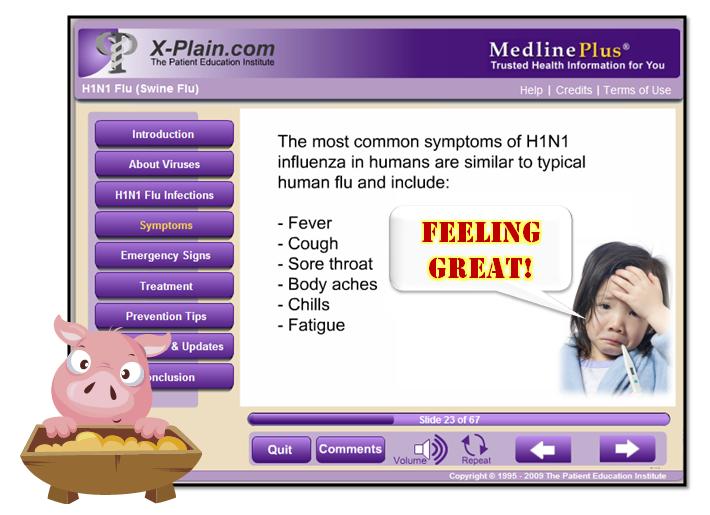
 NOTE: These tutorials require a special Flash plug-in, version 8 or above. If you do not have Flash, you will be prompted to obtain a free download of the software before you start the tutorial.


 Simply install this YouTube Video Wizard (YTV) dude. You can download versions for PowerPoint 2007 and 2003 (and earlier), so having an old PowerPoint version is totally alright.
 Today, we should think of Internet as oxygen for learning, and if it is not there, then we have to find other ways to breath, like showing videos offline (but giving credit and linking to the rightful creators). Ops, let's get back on track...
 Posts
Posts